Fixing Not Secure Website Error

    How to solve mixed content warnings and activate the green padlock. Eliminate the browser security blocks, audit insecure database links, and transition your entire asset portfolio to a flawless, fully encrypted protocol.

    The Invisible Wall: How Insecure Asset Delivery Kills Your Conversion Funnels

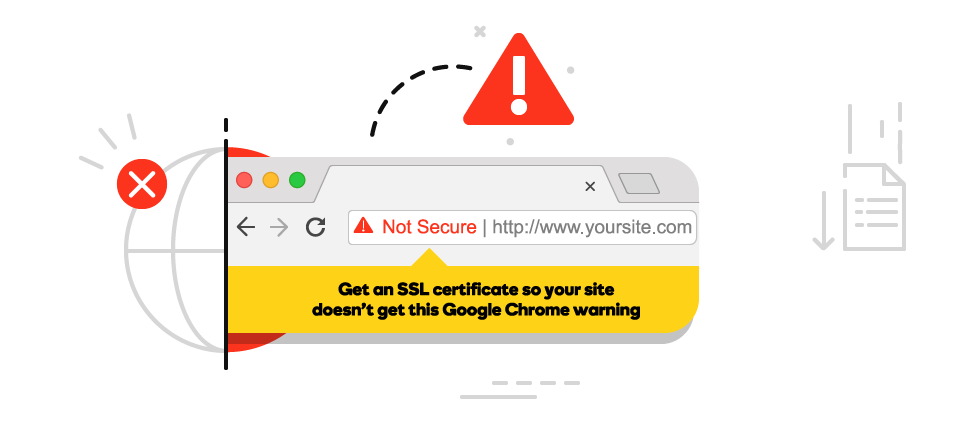
    For web engineering teams, e-commerce managers, and digital growth directors, few technical setbacks are as damaging to brand reputation as the dreaded "Not Secure" warning. You may have already purchased and successfully installed a valid SSL certificate on your hosting server. Yet, when visitors load your site, the expected lock icon is missing, replaced instead by an alarming warning icon or a message stating "Your connection to this site is not fully secure." At TY ALPHA, TECHNOLOGY, we know this issue is rarely a problem with the SSL certificate itself; rather, it is a symptom of a highly common architectural error known as **Mixed Content**.

    Mixed content occurs when the initial HTML of a webpage is loaded over a secure "HTTPS" connection, but secondary assets within that page—such as images, CSS stylesheets, JavaScript files, or custom fonts—are still being pulled from old, insecure "HTTP" links. Modern web browsers view this as a severe security gap. If an attacker intercepts your visitors' connections, they can easily tamper with those unencrypted HTTP scripts, injecting malicious code or tracking user behavior. To protect consumers, browsers like Chrome, Safari, and Edge actively flag these pages, destroying user trust and causing shopping cart abandonment rates to skyrocket in seconds.

    Resolving the "Not Secure" warning requires looking beyond simple page-refresh solutions. To establish a permanently secure environment, your engineering team must run thorough asset audits, perform safe database search-and-replace queries, and set up strict global security headers.

    Fixing Not Secure Website and Mixed Content Errors by TY ALPHA TECHNOLOGY

    The Five Technical Pillars of Fixing Mixed Content Warnings

    To permanently eliminate "Not Secure" warnings and display a flawless security lock across your entire platform, your technical team must implement these five core pillars:

    • Comprehensive Asset Auditing: Using advanced browser console diagnostics and crawl tools to identify every single asset loading over insecure "HTTP" protocols.
    • Serialized Database Search-and-Replace: Safely scanning your site's database to change all hardcoded "http://" links to "https://" without breaking serialized PHP arrays or website layouts.
    • Enforced HTTPS Server-Level Redirects: Configuring your server control rules (such as `.htaccess` on Apache or `nginx.conf` blocks) to automatically force every visitor onto a secure connection.
    • Content Security Policy (CSP) Implementation: Adding advanced security headers that instruct web browsers to automatically upgrade insecure resource requests to secure "HTTPS" on the fly.
    • Third-Party Integration Verification: Auditing external tracking pixels, ad networks, and payment gateway scripts to confirm they deliver resources exclusively over encrypted endpoints.

    The Secure Advantage: Maximizing Trust and Search Engine Performance

    The primary business benefit of resolving mixed content errors is the immediate restoration of consumer trust. When your site displays a clean, solid padlock, visitors feel safe inputting personal data and completing purchases. This seamless experience directly reflects in your bottom line, boosting your search rankings and keeping your ad campaigns running efficiently.

    Additionally, fixing these errors prevents issues with search engines. Google's core algorithm prioritizes fully secure sites, and having mixed content can hurt your organic search rankings. By cleaning up your database links and locking down your protocols, you protect your digital investments and keep your platform safe from malicious attacks. At TY ALPHA, TECHNOLOGY, we help businesses audit and optimize their web configurations, ensuring their digital presence remains fast, stable, and completely secure.


    The Mixed Content Matrix: Passive vs. Active Warnings

    This structured matrix details the two primary categories of mixed content errors and how web browsers handle them:

    Mixed Content Type Associated Assets Browser Behavior & Security Risk
    Passive Mixed Content (Insecure Display) Images (`<img>`), audio tracks, video files, and basic media embeds. **Padlock Disappears.** The browser loads the content but strips the green lock icon, displaying an info warning instead. Low risk, but highly damaging to brand presentation.
    Active Mixed Content (Insecure Scripting) JavaScript files (`<script>`), CSS files, WebSockets, and `<iframe>` blocks. **Hard Blocked by Default.** Modern browsers actively block these files from loading at all, which often breaks your site's layouts, buttons, and checkout scripts. High security risk.

    Refining the Infrastructure: Why Security Demands a Clean, Modern Hosting Platform

    A common mistake for growing brands is trying to fix mixed content warnings by using heavy, slow plugins that rewrite links on the fly. While these plugins offer a quick fix, they place a heavy load on your web server, slowing down your page speeds and hurting your search rankings. A slow page load is just as bad for conversions as a "Not Secure" warning.

    To keep your website secure and running fast, your team must resolve mixed content issues directly at the source—within your database and server configurations. This means cleaning up old code, pointing your DNS to high-performance servers, and utilizing fast global Content Delivery Networks (CDNs) to manage your SSL handshakes. By combining direct database optimization with a modern hosting platform, you protect your user data, boost your site speed, and deliver a seamless, fully secure shopping experience.


    Fixing Your "Not Secure" Error: A 6-Step Resolution Blueprint

    To audit your website, safely resolve mixed content warnings, and restore your secure padlock icon, follow these six steps:

    1. Run a Full HTTPS Security Scan

    Use developer tools or online scanners (like Whynopadlock.com) to identify every insecure "HTTP" script, image, or stylesheet on your site.

    2. Backup Your Website Database

    Create a complete backup of your website files and database before running any global search-and-replace queries.

    3. Execute a Database Search-and-Replace

    Use a safe search-and-replace tool to scan your database tables, changing all old "http://yourbrand.com" links to "https://yourbrand.com".

    4. Force Global Server-Level HTTPS Redirects

    Update your server-side configurations (like your `.htaccess` file) to automatically redirect all incoming "HTTP" traffic to the secure "HTTPS" address.

    5. Implement the Upgrade-Insecure-Requests Security Header

    Add a Content Security Policy (CSP) header to your server configuration, instructing browsers to upgrade any remaining insecure links automatically.

    6. Clear Server Caches and Verify the Padlock

    Clear your server-side, CDN, and browser caches, then reload your site to confirm the secure green padlock is active on all pages.


    Ready to Eliminate Website Security Warnings and Build Immediate Consumer Trust?

    Fixing your website's "Not Secure" warnings is a critical business step—it keeps your checkout flows encrypted, protects your marketing campaigns from dropped traffic, and builds the deep customer trust your brand needs to scale.

    If your business requires a professional security audit, help resolving complex database errors, or expert engineering support to build a fast, secure web platform, we are ready to assist you. The development and server optimization team at TY ALPHA, TECHNOLOGY specializes in keeping online systems fast, stable, and highly secure, helping business leaders build robust, scalable web architectures designed for long-term growth.