Signs You Need Hosting Upgrade

    When to move from shared resources to dedicated private server setups. Recognize the architectural warning signs of resource exhaustion, protect your conversion rates, and transition to isolated virtual environments with zero friction.

    The Growth Bottleneck: How Underpowered Infrastructure Silently Limits Your Scaling Potential

    For scaling retail founders, digital marketing leads, and platform managers, witnessing a consistent climb in organic traffic and daily sales is the ultimate validation of business strategy. However, as your customer database expands and your marketing campaigns drive larger concurrent crowds to your storefront, your underlying hardware faces an invisible, mathematical breaking point. Many growing brands realize their server is failing only after a catastrophic crash during a major promotion. At TY ALPHA, TECHNOLOGY, we believe that smart business scaling requires identifying the early warning signs of server strain and proactively transitioning from shared resources to isolated setups before performance drops damage your user experience.

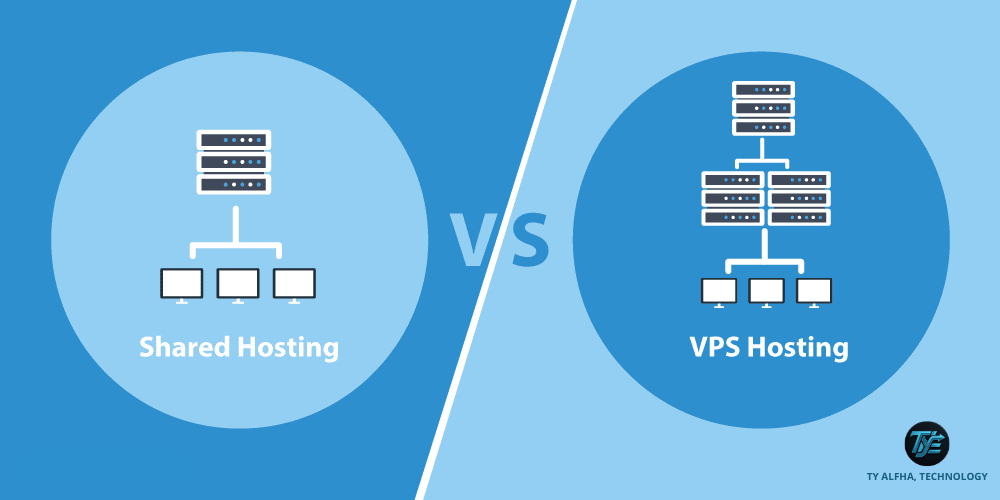
    In an introductory shared hosting environment, your website lives on a server with hundreds of other tenants, all pulling from the same physical CPU, RAM, and network bandwidth. As your store grows, your dynamic operations—such as processing payment checkouts, executing live product searches, and managing customer carts—require deeper memory allocations. When these requests exceed the rigid limits set by your budget host, the server throttles your account. Instead of loading your site, it serves slow-loading pages, database connection errors, or outright crashes. Transitioning to a Virtual Private Server (VPS) or a dedicated cloud node ensures your scaling storefront operates with guaranteed, isolated hardware allocations designed to handle high-volume transactional workloads.

    However, executing a successful infrastructure upgrade means looking beyond simple uptime percentages. To protect your brand's reputation and search engine rankings, your development team must analyze backend error codes, track your memory consumption trends, and evaluate database query bottlenecks.

    Identifying Key Signs for a Web Hosting Upgrade by TY ALPHA TECHNOLOGY

    The Five Critical Indicators That Your Store Has Outgrown Shared Hosting

    If your digital storefront is experiencing any of the following operational symptoms, your system is actively signaling the need for dedicated server resources:

    • Frequent 503 Service Unavailable and 504 Gateway Timeout Errors: These HTTP error codes indicate that your hosting server is overwhelmed with requests and is failing to execute your site's code, leaving visitors stranded on blank pages.
    • Consistently Slow Time to First Byte (TTFB): When a browser requests your site and experiences a multi-second delay before receiving the first byte of data, your shared server is struggling to process the active server-side scripts and database queries.
    • Aggressive Account Throttling and Resource Warnings: Receiving warnings or automatic suspensions from your hosting provider for exceeding CPU, RAM, or daily entry-process limits, which directly interrupts your active marketing campaigns.
    • Sluggish Backend Dashboard and Admin Operations: When saving changes, uploading product media, or generating sales reports inside your CMS dashboard becomes incredibly slow, indicating your environment lacks sufficient processing power.
    • Strict Security and Custom Software Limitations: The inability to install modern database speed-boosters (like Redis), configure custom firewalls, or manage root-level configurations because of the restrictive, uniform rules of shared platforms.

    The Dedicated Advantage: Unlocking Speed, Security, and Freedom

    The primary business benefit of upgrading your hosting environment to a VPS or dedicated cloud setup is the immediate elimination of shared performance bottlenecks. When your platform operates within its own dedicated partition, your database queries execute instantly, your checkout screens process payments without delay, and your page speeds remain fast, even during heavy traffic spikes. This friction-free user journey directly translates into lower cart abandonment rates and a stronger return on advertising spend (ROAS).

    Additionally, moving to a private server provides total administrative control. Your engineering team can customize server-level caching rules, deploy advanced security protocols, and configure automated backups tailored to your unique database requirements. At TY ALPHA, TECHNOLOGY, we help scaling brands assess their resource consumption and transition their platforms to high-performance, private environments designed for long-term commercial success.


    The Hosting Resource Matrix: Evaluating Shared Environments vs. Dedicated Upgrades

    This structured matrix compares the performance limitations of budget shared environments with the high-performance capabilities of upgraded dedicated private hosting:

    Operational Metric Shared Hosting (Underpowered Baseline) VPS / Dedicated Cloud (Upgraded Environment)
    Resource Isolation **Shared.** You compete with thousands of other sites on the same hardware, leading to unstable speeds. **100% Dedicated.** All allocated CPU, RAM, and SSD storage are reserved exclusively for your web application.
    Traffic Resilience **Very Low.** A sudden visitor spike can exhaust your account's limits, causing immediate site downtime. **High.** Built to easily absorb sudden traffic surges from marketing campaigns and seasonal sales events.
    Administrative Control **Restricted.** No root access. You cannot modify core server software, install custom modules, or set custom caches. **Full Root Access.** Complete freedom to configure the server environment to match your technical requirements.
    Security Isolation **Shared Risks.** A single security exploit on a neighboring website can compromise the entire shared server. **Fully Sandboxed.** Your containerized file system is entirely isolated, shielding your customer data from external threats.

    Refining the Upgrade: Why Powerful Hardware Still Requires Strategic Optimization

    A common trap for growing online retailers is assuming that upgrading to an expensive dedicated server will automatically fix a slow, unoptimized website. While a premium private server provides the necessary physical foundation, running bloated site templates, oversized image files, or unoptimized database queries will still slow down your platform. If your front-end development contains critical bugs, upgrading your server is only a costly temporary fix.

    To transform your new dedicated hosting environment into a highly profitable sales engine, your development team must pair powerful hardware with clean development habits. This means optimizing your database structures, utilizing lightweight theme designs, compressing media files, and implementing advanced server caching rules. By combining an optimized storefront design with a scalable, private hosting platform, you protect your advertising investments, maximize site speed, and guarantee a seamless, high-speed checkout experience for every single buyer.


    Upgrading Your Hosting Environment: A 6-Step Implementation Guide

    To transition your web platform from shared resource hosting to a fast, reliable dedicated private server, follow these six steps:

    1. Analyze Your Peak Traffic and Database Requirements

    Review your hosting control panel logs to measure your peak RAM usage, CPU spikes, and active database transaction sizes.

    2. Select an Upgraded Managed VPS or Dedicated Cloud Tier

    Choose an upgraded private environment that offers plenty of isolated memory and computing power to handle your scaling traffic.

    3. Build a Complete Staging Mirror on the New Server

    Deploy your site files and database into a private staging sandbox on your new server to verify compatibility before making any live changes.

    4. Perform Rigorous Performance and Checkout Testing

    Run simulated traffic and processing tests in the sandbox to ensure your payment checkouts, searches, and pages run with zero lag.

    5. Sync Your Live Database and Point Your DNS

    Perform a final data sync during your lowest-traffic hours. Point your domain to the new private server and install your secure SSL certificates.

    6. Monitor Server Resources and Uptime Continuously

    Set up automated monitoring tools to track CPU loads, memory usage, and site response times to ensure your new platform runs smoothly.


    Ready to Transition Your Store to a Highly Scalable, Private Server?

    Upgrading to a dedicated private server is a critical operational milestone—it protects your marketing investments, keeps your storefront accessible during critical sales events, and provides a smooth shopping experience that turns visitors into loyal customers.

    If your business requires a reliable hosting migration strategy, help configuring custom private server environments, or professional engineering support to optimize your database, we are ready to support you. The development and engineering team at TY ALPHA, TECHNOLOGY specializes in keeping complex digital systems fast, stable, and highly secure, helping corporate leaders build robust, scalable e-commerce platforms designed for long-term growth.